
RecyclerView源码分析
更新: 2/4/2026 字数: 0 字 时长: 0 分钟

绘制流程
RecyclerView 继承的是 ViewGroup,所以绘制过程还是 onMeasure,onLayout,onDraw 这三个步骤。
onMeasure
看一下源码:
@Override
protected void onMeasure(int widthSpec, int heightSpec) {
    if (mLayout == null) {
        // 情况1
    }
    if (mLayout.isAutoMeasureEnabled()) {
        // 情况2
    } else {
        // 情况3
    }
}这里的 mLayout 为 LayoutManager 对象,负责 rv 里面 item 的布局和测量。分为三种情况:
- mLayout 为 null,这时 rv 是不能显示任何数据的。
- mLayout 不为 null,但开启了自动测量
- mLayout 不为 null,没开启自动测量
mLayout 为 null 的情况
看一下代码:
if (mLayout == null) {
    defaultOnMeasure(widthSpec, heightSpec);
    return;
}可以看到进入了一个 defaultOnMeasure的方法,我们看一下:
void defaultOnMeasure(int widthSpec, int heightSpec) {
    final int width = LayoutManager.chooseSize(widthSpec,
                                               getPaddingLeft() + getPaddingRight(),
                                               ViewCompat.getMinimumWidth(this));
    final int height = LayoutManager.chooseSize(heightSpec,
                                                getPaddingTop() + getPaddingBottom(),
                                                ViewCompat.getMinimumHeight(this));

    setMeasuredDimension(width, height);
}调用了 chooseSize()方法获取宽高,然后调用 setMeasureDimension()设置宽高:
public static int chooseSize(int spec, int desired, int min) {
    final int mode = View.MeasureSpec.getMode(spec);
    final int size = View.MeasureSpec.getSize(spec);
    switch (mode) {
        case View.MeasureSpec.EXACTLY:
            return size;
        case View.MeasureSpec.AT_MOST:
            return Math.min(size, Math.max(desired, min));
        case View.MeasureSpec.UNSPECIFIED:
        default:
            return Math.max(desired, min);
    }
}这里就是通过不同的测量模式选取不同的值。
mLayout 开启了自动测量
if (mLayout.isAutoMeasureEnabled()) {
    // 这里获取了测量模式
    final int widthMode = MeasureSpec.getMode(widthSpec);
    final int heightMode = MeasureSpec.getMode(heightSpec);

    // 进入LayoutManager的测量流程
    mLayout.onMeasure(mRecycler, mState, widthSpec, heightSpec);

    // 判断是否是精确模式,确定是否需要跳过测量
    final boolean measureSpecModeIsExactly =
    widthMode == MeasureSpec.EXACTLY && heightMode == MeasureSpec.EXACTLY;

    // 如果可以跳过测量/adapter为null,则直接返回
    if (measureSpecModeIsExactly || mAdapter == null) {
        return;
    }

    if (mState.mLayoutStep == State.STEP_START) {
        dispatchLayoutStep1();
    }

    mLayout.setMeasureSpecs(widthSpec, heightSpec);
    mState.mIsMeasuring = true;
    dispatchLayoutStep2();

    mLayout.setMeasuredDimensionFromChildren(widthSpec, heightSpec);

    if (mLayout.shouldMeasureTwice()) {
        mLayout.setMeasureSpecs(
            MeasureSpec.makeMeasureSpec(getMeasuredWidth(), MeasureSpec.EXACTLY),
            MeasureSpec.makeMeasureSpec(getMeasuredHeight(), MeasureSpec.EXACTLY));
        mState.mIsMeasuring = true;
        dispatchLayoutStep2();

        mLayout.setMeasuredDimensionFromChildren(widthSpec, heightSpec);
    }
}这里 LayoutManager 的 onMeasure 方法并没有覆写,而是直接调用的 RecyclerView 的 defaultOnMeasure 方法。
然后会判断当前的状态mState.mLayoutStep,这是 RecyclerView.State 对象,有三种状态,分别对应三种不同的 dispatchLayoutStep 方法(还有一个 dispatchLayoutStep3):
| State.mLayoutStep | dispatchLayoutStep | 含义 |
|---|---|---|
| STEP_START | dispatchLayoutStep1() | 这是默认值,执行完 dispatchLayoutStep1()后会变成 STEP_LAYOUT |
| STEP_LAYOUT | dispatchLayoutStep2() | 调用 dispatchLayoutStep2 对子 View layout完后变成STEP_ANIMATION |
| STEP_ANIMATION | dispatchLayoutStep3() | 执行动画阶段,调用dispatchLayoutStep3()会变成 STEP_START |
dispatchLayoutStep1()
private void dispatchLayoutStep1() {
    ...
    processAdapterUpdatesAndSetAnimationFlags();
    ...

    if (mState.mRunSimpleAnimations) {
        // Step 0:找出所有未移除的ItemView,进行预布局
    }
    if (mState.mRunPredictiveAnimations) {
       // Step 1:预布局
    } else {
        clearOldPositions();
    }
    onExitLayoutOrScroll();
    stopInterceptRequestLayout(false);
    mState.mLayoutStep = State.STEP_LAYOUT; // 这里改变了RV的绘制状态
}这个方法主要是根据 mState 的 mRunSimpleAnimations 和 mRunPredictiveAnimations 的值进行不同的处理,而processAdapterUpdatesAndSetAnimationFlags()就是给这些值进行了初始化。
private void processAdapterUpdatesAndSetAnimationFlags() {
    ...
    // 在这里对值进行了计算
    mState.mRunSimpleAnimations = mFirstLayoutComplete
    && mItemAnimator != null
    && (mDataSetHasChangedAfterLayout
        || animationTypeSupported
        || mLayout.mRequestedSimpleAnimations)
    && (!mDataSetHasChangedAfterLayout
        || mAdapter.hasStableIds());
    mState.mRunPredictiveAnimations = mState.mRunSimpleAnimations
    && animationTypeSupported
    && !mDataSetHasChangedAfterLayout
    && predictiveItemAnimationsEnabled();
}dispatchLayoutStep2()
onMeasure()流程中,执行完 dispatchLayoutStep1()方法后就会执行 dispatchLayoutStep2():
private void dispatchLayoutStep2() {
    startInterceptRequestLayout();
    onEnterLayoutOrScroll();
    mState.assertLayoutStep(State.STEP_LAYOUT | State.STEP_ANIMATIONS);
    mAdapterHelper.consumeUpdatesInOnePass();
    mState.mItemCount = mAdapter.getItemCount();
    mState.mDeletedInvisibleItemCountSincePreviousLayout = 0;

    // Step 2: Run layout
    mState.mInPreLayout = false;
    mLayout.onLayoutChildren(mRecycler, mState);

    mState.mStructureChanged = false;
    mPendingSavedState = null;

    // onLayoutChildren may have caused client code to disable item animations; re-check
    mState.mRunSimpleAnimations = mState.mRunSimpleAnimations && mItemAnimator != null;
    mState.mLayoutStep = State.STEP_ANIMATIONS;
    onExitLayoutOrScroll();
    stopInterceptRequestLayout(false);
}这里主要就是对 rv 的子 View 进行 layout,onLayoutChildren 又由 LayoutManager 的子类实现。
LayoutManager 没有开启自动测量时
else {
    if (mHasFixedSize) {
        mLayout.onMeasure(mRecycler, mState, widthSpec, heightSpec);
        return;
    }
    // custom onMeasure
    if (mAdapterUpdateDuringMeasure) {
        startInterceptRequestLayout();
        onEnterLayoutOrScroll();
        processAdapterUpdatesAndSetAnimationFlags();
        onExitLayoutOrScroll();

        if (mState.mRunPredictiveAnimations) {
            mState.mInPreLayout = true;
        } else {
            // consume remaining updates to provide a consistent state with the layout pass.
            mAdapterHelper.consumeUpdatesInOnePass();
            mState.mInPreLayout = false;
        }
        mAdapterUpdateDuringMeasure = false;
        stopInterceptRequestLayout(false);
    } else if (mState.mRunPredictiveAnimations) {
        setMeasuredDimension(getMeasuredWidth(), getMeasuredHeight());
        return;
    }

    if (mAdapter != null) {
        mState.mItemCount = mAdapter.getItemCount();
    } else {
        mState.mItemCount = 0;
    }
    startInterceptRequestLayout();
    mLayout.onMeasure(mRecycler, mState, widthSpec, heightSpec);
    stopInterceptRequestLayout(false);
    mState.mInPreLayout = false; // clear
}如果 mHasFixedSize 为 true(可以通过 setHasFixedSize 方法设置),则直接调用 LayoutManager 的 onMeasure 方法进行测量,如果为 false,则先判断mAdapterUpdateDuringMeasure 是否有数据更新,如果有则先进行更新再调用 LayoutManager 的 onMeasure 方法。
onLayout
measure 流程完后就是 layout,看一下 layout 方法:
@Override
protected void onLayout(boolean changed, int l, int t, int r, int b) {
    TraceCompat.beginSection(TRACE_ON_LAYOUT_TAG);
    dispatchLayout();
    TraceCompat.endSection();
    mFirstLayoutComplete = true;
}很简单,重要的是在 dispatchLayout 方法里面:
void dispatchLayout() {
    if (mAdapter == null) {
        Log.e(TAG, "No adapter attached; skipping layout");
        // leave the state in START
        return;
    }
    if (mLayout == null) {
        Log.e(TAG, "No layout manager attached; skipping layout");
        // leave the state in START
        return;
    }
    mState.mIsMeasuring = false;
    if (mState.mLayoutStep == State.STEP_START) {
        dispatchLayoutStep1();
        mLayout.setExactMeasureSpecsFrom(this);
        dispatchLayoutStep2();
    } else if (mAdapterHelper.hasUpdates() || mLayout.getWidth() != getWidth()
               || mLayout.getHeight() != getHeight()) {
        // First 2 steps are done in onMeasure but looks like we have to run again due to
        // changed size.
        mLayout.setExactMeasureSpecsFrom(this);
        dispatchLayoutStep2();
    } else {
        // always make sure we sync them (to ensure mode is exact)
        mLayout.setExactMeasureSpecsFrom(this);
    }
    dispatchLayoutStep3();
}如果 mAdapter 或者 mLayout 为 null,则直接返回,因此如果没有给 rv 设置 LayoutManager,那么 rv 是不会加载数据的。这个方法里面保证了 layout 流程中所必需的三个流程 dispatchLayout1/2/3。看一下 dispatchLayout3:
private void dispatchLayoutStep3() {
    ...
    mState.mLayoutStep = State.STEP_START;
    ...
}这里就是将 state 状态置为之前的值,确保第二次 layout 时也能执行三个方法,剩下的则是跟 ItemAnimator 有关。
draw 流程
@Override
public void draw(Canvas c) {
super.draw(c);

final int count = mItemDecorations.size();
for (int i = 0; i < count; i++) {
	mItemDecorations.get(i).onDrawOver(c, this, mState);
}
// TODO If padding is not 0 and clipChildrenToPadding is false, to draw glows properly, we
// need find children closest to edges. Not sure if it is worth the effort.
boolean needsInvalidate = false;
if (mLeftGlow != null && !mLeftGlow.isFinished()) {
	final int restore = c.save();
	final int padding = mClipToPadding ? getPaddingBottom() : 0;
	c.rotate(270);
	c.translate(-getHeight() + padding, 0);
	needsInvalidate = mLeftGlow != null && mLeftGlow.draw(c);
	c.restoreToCount(restore);
}
if (mTopGlow != null && !mTopGlow.isFinished()) {
	final int restore = c.save();
	if (mClipToPadding) {
		c.translate(getPaddingLeft(), getPaddingTop());
	}
	needsInvalidate |= mTopGlow != null && mTopGlow.draw(c);
	c.restoreToCount(restore);
}
if (mRightGlow != null && !mRightGlow.isFinished()) {
	final int restore = c.save();
	final int width = getWidth();
	final int padding = mClipToPadding ? getPaddingTop() : 0;
	c.rotate(90);
	c.translate(-padding, -width);
	needsInvalidate |= mRightGlow != null && mRightGlow.draw(c);
	c.restoreToCount(restore);
}
if (mBottomGlow != null && !mBottomGlow.isFinished()) {
	final int restore = c.save();
	c.rotate(180);
	if (mClipToPadding) {
		c.translate(-getWidth() + getPaddingRight(), -getHeight() + getPaddingBottom());
	} else {
		c.translate(-getWidth(), -getHeight());
	}
	needsInvalidate |= mBottomGlow != null && mBottomGlow.draw(c);
	c.restoreToCount(restore);
}

// If some views are animating, ItemDecorators are likely to move/change with them.
// Invalidate RecyclerView to re-draw decorators. This is still efficient because children's
// display lists are not invalidated.
if (!needsInvalidate && mItemAnimator != null && mItemDecorations.size() > 0
	&& mItemAnimator.isRunning()) {
	needsInvalidate = true;
}

if (needsInvalidate) {
	ViewCompat.postInvalidateOnAnimation(this);
}
}
public void draw(Canvas c) {
	super.draw(c);

	final int count = mItemDecorations.size();
	for (int i = 0; i < count; i++) {
		mItemDecorations.get(i).onDrawOver(c, this, mState);
	}
	// TODO If padding is not 0 and clipChildrenToPadding is false, to draw glows properly, we
	// need find children closest to edges. Not sure if it is worth the effort.
	...
}大概就是调用 super.draw(),然后将子 view 的绘制分发给 View 类,再回调 rv 的 onDraw 方法:
@Override
public void onDraw(Canvas c) {
    super.onDraw(c);

    final int count = mItemDecorations.size();
    for (int i = 0; i < count; i++) {
        mItemDecorations.get(i).onDraw(c, this, mState);
    }
}这里是将分割线的绘制分发给 ItemDecoration 的 onDraw 方法,又调用 ItemDecoration 的 onDrawOver 方法,绘制一些装饰。如果RecyclerView调用了setClipToPadding,会实现一种特殊的滑动效果--每个ItemView可以滑动到padding区域。
推荐博客:
LinearLayoutManager.onLayoutChildren 方法
@Override
public void onLayoutChildren(RecyclerView.Recycler recycler, RecyclerView.State state) {
	// layout algorithm:
	// 1) by checking children and other variables, find an anchor coordinate and an anchor
	//  item position.
	// 2) fill towards start, stacking from bottom
	// 3) fill towards end, stacking from top
	// 4) scroll to fulfill requirements like stack from bottom.
	// create layout state
	if (DEBUG) {
		Log.d(TAG, "is pre layout:" + state.isPreLayout());
	}
	if (mPendingSavedState != null || mPendingScrollPosition != RecyclerView.NO_POSITION) {
		if (state.getItemCount() == 0) {
			removeAndRecycleAllViews(recycler);
			return;
		}
	}
	if (mPendingSavedState != null && mPendingSavedState.hasValidAnchor()) {
		mPendingScrollPosition = mPendingSavedState.mAnchorPosition;
	}

	ensureLayoutState();
	mLayoutState.mRecycle = false;
	// resolve layout direction
	resolveShouldLayoutReverse();

	final View focused = getFocusedChild();
	if (!mAnchorInfo.mValid || mPendingScrollPosition != RecyclerView.NO_POSITION
		|| mPendingSavedState != null) {
		mAnchorInfo.reset();
		mAnchorInfo.mLayoutFromEnd = mShouldReverseLayout ^ mStackFromEnd;
		// calculate anchor position and coordinate
		updateAnchorInfoForLayout(recycler, state, mAnchorInfo);
		mAnchorInfo.mValid = true;
	} else if (focused != null && (mOrientationHelper.getDecoratedStart(focused)
								   >= mOrientationHelper.getEndAfterPadding()
								   || mOrientationHelper.getDecoratedEnd(focused)
								   <= mOrientationHelper.getStartAfterPadding())) {
		mAnchorInfo.assignFromViewAndKeepVisibleRect(focused, getPosition(focused));
	}
	if (DEBUG) {
		Log.d(TAG, "Anchor info:" + mAnchorInfo);
	}
	mLayoutState.mLayoutDirection = mLayoutState.mLastScrollDelta >= 0
	? LayoutState.LAYOUT_END : LayoutState.LAYOUT_START;
	mReusableIntPair[0] = 0;
	mReusableIntPair[1] = 0;
	calculateExtraLayoutSpace(state, mReusableIntPair);
	int extraForStart = Math.max(0, mReusableIntPair[0])
	+ mOrientationHelper.getStartAfterPadding();
	int extraForEnd = Math.max(0, mReusableIntPair[1])
	+ mOrientationHelper.getEndPadding();
	if (state.isPreLayout() && mPendingScrollPosition != RecyclerView.NO_POSITION
		&& mPendingScrollPositionOffset != INVALID_OFFSET) {
		final View existing = findViewByPosition(mPendingScrollPosition);
		if (existing != null) {
			final int current;
			final int upcomingOffset;
			if (mShouldReverseLayout) {
				current = mOrientationHelper.getEndAfterPadding()
				- mOrientationHelper.getDecoratedEnd(existing);
				upcomingOffset = current - mPendingScrollPositionOffset;
			} else {
				current = mOrientationHelper.getDecoratedStart(existing)
				- mOrientationHelper.getStartAfterPadding();
				upcomingOffset = mPendingScrollPositionOffset - current;
			}
			if (upcomingOffset > 0) {
				extraForStart += upcomingOffset;
			} else {
				extraForEnd -= upcomingOffset;
			}
		}
	}
	int startOffset;
	int endOffset;
	final int firstLayoutDirection;
	if (mAnchorInfo.mLayoutFromEnd) {
		firstLayoutDirection = mShouldReverseLayout ? LayoutState.ITEM_DIRECTION_TAIL
		: LayoutState.ITEM_DIRECTION_HEAD;
	} else {
		firstLayoutDirection = mShouldReverseLayout ? LayoutState.ITEM_DIRECTION_HEAD
		: LayoutState.ITEM_DIRECTION_TAIL;
	}

	onAnchorReady(recycler, state, mAnchorInfo, firstLayoutDirection);
	detachAndScrapAttachedViews(recycler);
	mLayoutState.mInfinite = resolveIsInfinite();
	mLayoutState.mIsPreLayout = state.isPreLayout();
	mLayoutState.mNoRecycleSpace = 0;
	if (mAnchorInfo.mLayoutFromEnd) {
		updateLayoutStateToFillStart(mAnchorInfo);
		mLayoutState.mExtraFillSpace = extraForStart;
		fill(recycler, mLayoutState, state, false);
		startOffset = mLayoutState.mOffset;
		final int firstElement = mLayoutState.mCurrentPosition;
		if (mLayoutState.mAvailable > 0) {
			extraForEnd += mLayoutState.mAvailable;
		}
		// fill towards end
		updateLayoutStateToFillEnd(mAnchorInfo);
		mLayoutState.mExtraFillSpace = extraForEnd;
		mLayoutState.mCurrentPosition += mLayoutState.mItemDirection;
		fill(recycler, mLayoutState, state, false);
		endOffset = mLayoutState.mOffset;

		if (mLayoutState.mAvailable > 0) {
			// end could not consume all. add more items towards start
			extraForStart = mLayoutState.mAvailable;
			updateLayoutStateToFillStart(firstElement, startOffset);
			mLayoutState.mExtraFillSpace = extraForStart;
			fill(recycler, mLayoutState, state, false);
			startOffset = mLayoutState.mOffset;
		}
	} else {
		// fill towards end
		updateLayoutStateToFillEnd(mAnchorInfo);
		mLayoutState.mExtraFillSpace = extraForEnd;
		fill(recycler, mLayoutState, state, false);
		endOffset = mLayoutState.mOffset;
		final int lastElement = mLayoutState.mCurrentPosition;
		if (mLayoutState.mAvailable > 0) {
			extraForStart += mLayoutState.mAvailable;
		}
		// fill towards start
		updateLayoutStateToFillStart(mAnchorInfo);
		mLayoutState.mExtraFillSpace = extraForStart;
		mLayoutState.mCurrentPosition += mLayoutState.mItemDirection;
		fill(recycler, mLayoutState, state, false);
		startOffset = mLayoutState.mOffset;

		if (mLayoutState.mAvailable > 0) {
			extraForEnd = mLayoutState.mAvailable;
			// start could not consume all it should. add more items towards end
			updateLayoutStateToFillEnd(lastElement, endOffset);
			mLayoutState.mExtraFillSpace = extraForEnd;
			fill(recycler, mLayoutState, state, false);
			endOffset = mLayoutState.mOffset;
		}
	}
	if (getChildCount() > 0) {
		if (mShouldReverseLayout ^ mStackFromEnd) {
			int fixOffset = fixLayoutEndGap(endOffset, recycler, state, true);
			startOffset += fixOffset;
			endOffset += fixOffset;
			fixOffset = fixLayoutStartGap(startOffset, recycler, state, false);
			startOffset += fixOffset;
			endOffset += fixOffset;
		} else {
			int fixOffset = fixLayoutStartGap(startOffset, recycler, state, true);
			startOffset += fixOffset;
			endOffset += fixOffset;
			fixOffset = fixLayoutEndGap(endOffset, recycler, state, false);
			startOffset += fixOffset;
			endOffset += fixOffset;
		}
	}
	layoutForPredictiveAnimations(recycler, state, startOffset, endOffset);
	if (!state.isPreLayout()) {
		mOrientationHelper.onLayoutComplete();
	} else {
		mAnchorInfo.reset();
	}
	mLastStackFromEnd = mStackFromEnd;
	if (DEBUG) {
		validateChildOrder();
	}
}主要的几个步骤是:
- 确定锚点信息,找到一个锚点坐标与锚点。
- 根据锚点信息,进行填充。
- 如果还有剩余,则再填充一次。
确定锚点信息
resolveShouldLayoutReverse()方法判断了当前是否需要倒着绘制:
private void resolveShouldLayoutReverse() {
	// A == B is the same result, but we rather keep it readable
	if (mOrientation == VERTICAL || !isLayoutRTL()) {
		mShouldReverseLayout = mReverseLayout;
	} else {
		mShouldReverseLayout = !mReverseLayout;
	}
}默认是 false,可以通过 setReverseLayout()方法改变值,然后就是调用 updateAnchorInfoForLayout(recycler, state, mAnchorInfo)方法更新锚点。mAnchorInfo 就是一个 AnchorInfo 类的锚点对象:
static class AnchorInfo {
    OrientationHelper mOrientationHelper;
    int mPosition;
    int mCoordinate;
    boolean mLayoutFromEnd;
    boolean mValid;
}AnchorInfo 有四个变量,其中 mValid 的默认值为 false,一次测量后变为 true,onLayout 测量完成后会调用 reset()方法又变为 false。mLayoutFromEnd 有如下计算方法:
mLayoutFromEnd = mShouldReverseLayout ^ mStackFromEnd这两个参数默认都是 false ,所以如果不调用 setStackFromEnd,都是 false。
然后又调用了 updateAnchorInfoForLayout()方法,用来更新锚点信息:
private void updateAnchorInfoForLayout(RecyclerView.Recycler recycler, RecyclerView.State state,
									   AnchorInfo anchorInfo) {
	// 第一种计算方法
	if (updateAnchorFromPendingData(state, anchorInfo)) {
		if (DEBUG) {
			Log.d(TAG, "updated anchor info from pending information");
		}
		return;
	}

	// 第二种计算方法
	if (updateAnchorFromChildren(recycler, state, anchorInfo)) {
		if (DEBUG) {
			Log.d(TAG, "updated anchor info from existing children");
		}
		return;
	}
	if (DEBUG) {
		Log.d(TAG, "deciding anchor info for fresh state");
	}
	// 第三种计算方法
	anchorInfo.assignCoordinateFromPadding();
	anchorInfo.mPosition = mStackFromEnd ? state.getItemCount() - 1 : 0;
}- 第一种计算方法:如果存在未决的滚动位置或保存的状态,从该数据更新锚点信息并返回true
- 第二种计算方法:根据子View来更新锚点信息,如果一个子View有锚点,则根据其来计算锚点信息;如有一个子View没有锚点,则根据布局方向选取第一个View或最后一个View
- 第三种计算方法:前两种都未采用,则采取默认的第三种计算方式
回收子 View
``****属于RecyclerView缓存机制的部分,这里后面再说。子 View 填充
第三步是子 View 的内容的填充了,首先是判断是否逆向填充,如果是正向填充就先向下填充,再向上填充。逆向的话则相反,但都会调用两次 fill(),如果还有空余则还会调用一次 fill 进行填充。
缓存机制
RecyclerView 的核心就是其缓存机制,核心实现类是 Recycler 类,是 RecyclerView 的 View 管理者,其功能包括生成新 View,复用旧View,回收View,重新绑定View。下面是一些变量:
public final class Recycler {
	final ArrayList<ViewHolder> mAttachedScrap = new ArrayList<>();
	ArrayList<ViewHolder> mChangedScrap = null;

	final ArrayList<ViewHolder> mCachedViews = new ArrayList<ViewHolder>();

	private final List<ViewHolder>
	mUnmodifiableAttachedScrap = Collections.unmodifiableList(mAttachedScrap);

	private int mRequestedCacheMax = DEFAULT_CACHE_SIZE;
	int mViewCacheMax = DEFAULT_CACHE_SIZE;

	RecycledViewPool mRecyclerPool;

	private ViewCacheExtension mViewCacheExtension;

	static final int DEFAULT_CACHE_SIZE = 2;
}下面以 LinearLayoutManager 为例进行分析。
初步分析
RV 的 fill 方法中开始于 LayoutState.next 方法,我们就从这个方法开始:
View next(RecyclerView.Recycler recycler) {
	if (mScrapList != null) {
		return nextViewFromScrapList();
	}
	final View view = recycler.getViewForPosition(mCurrentPosition);
	mCurrentPosition += mItemDirection;
	return view;
}这里除了 mScrapList 之外,还有缓存 mScrapList,这个被 LinearLayoutManager 持有,其声明如下:
List<RecyclerView.ViewHolder> mScrapList = null;这是一个 ViewHolder 类型的 List,当 LinearLayoutManager 需要返回特定视图时就会设置这个参数,这种情况 LayoutState 只会从这里面取出视图,如果没有则返回 null。
接下俩看看 Recycler.getViewForPosition 方法:
@NonNull
public View getViewForPosition(int position) {
	return getViewForPosition(position, false);
}

View getViewForPosition(int position, boolean dryRun) {
	return tryGetViewHolderForPositionByDeadline(position, dryRun, FOREVER_NS).itemView;
}继续跟进这个方法,可以看到注释: 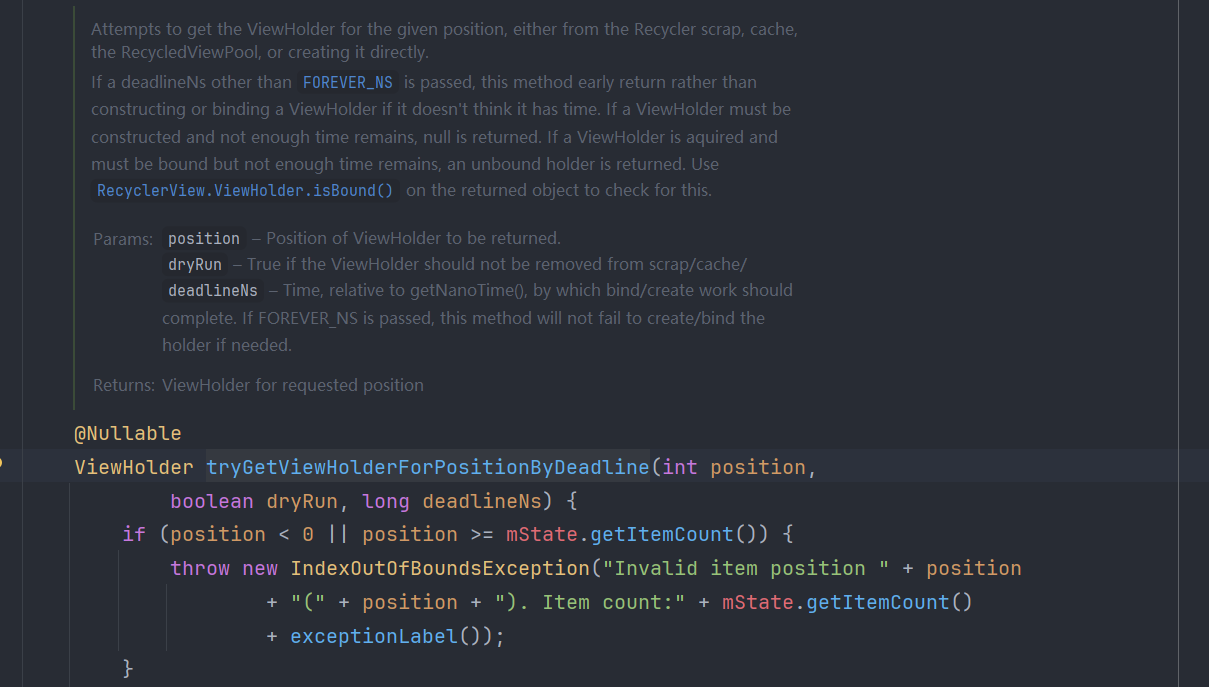
这里的注释表明了是从 Recycler 中的 scrap,cache,RecycledViewPool 中获取 ViewHolder,如果都获取不到则创建一个新的 ViewHolder。我们接下来就看一下这个代码:
ViewHolder tryGetViewHolderForPositionByDeadline(int position,
												 boolean dryRun, long deadlineNs) {
	if (position < 0 || position >= mState.getItemCount()) {
		throw new IndexOutOfBoundsException("Invalid item position " + position
											+ "(" + position + "). Item count:" + mState.getItemCount()
											+ exceptionLabel());
	}
	boolean fromScrapOrHiddenOrCache = false;
	ViewHolder holder = null;
	// 0) If there is a changed scrap, try to find from there
	if (mState.isPreLayout()) {
		holder = getChangedScrapViewForPosition(position);
		fromScrapOrHiddenOrCache = holder != null;
	}
	// 1) Find by position from scrap/hidden list/cache
	if (holder == null) {
		holder = getScrapOrHiddenOrCachedHolderForPosition(position, dryRun);
		if (holder != null) {
			if (!validateViewHolderForOffsetPosition(holder)) {
				// recycle holder (and unscrap if relevant) since it can't be used
				if (!dryRun) {
					// we would like to recycle this but need to make sure it is not used by
					// animation logic etc.
					holder.addFlags(ViewHolder.FLAG_INVALID);
					if (holder.isScrap()) {
						removeDetachedView(holder.itemView, false);
						holder.unScrap();
					} else if (holder.wasReturnedFromScrap()) {
						holder.clearReturnedFromScrapFlag();
					}
					recycleViewHolderInternal(holder);
				}
				holder = null;
			} else {
				fromScrapOrHiddenOrCache = true;
			}
		}
	}
	if (holder == null) {
		final int offsetPosition = mAdapterHelper.findPositionOffset(position);
		if (offsetPosition < 0 || offsetPosition >= mAdapter.getItemCount()) {
			throw new IndexOutOfBoundsException("Inconsistency detected. Invalid item "
												+ "position " + position + "(offset:" + offsetPosition + ")."
												+ "state:" + mState.getItemCount() + exceptionLabel());
		}

		final int type = mAdapter.getItemViewType(offsetPosition);
		// 2) Find from scrap/cache via stable ids, if exists
		if (mAdapter.hasStableIds()) {
			holder = getScrapOrCachedViewForId(mAdapter.getItemId(offsetPosition),
											   type, dryRun);
			if (holder != null) {
				// update position
				holder.mPosition = offsetPosition;
				fromScrapOrHiddenOrCache = true;
			}
		}
		if (holder == null && mViewCacheExtension != null) {
			// We are NOT sending the offsetPosition because LayoutManager does not
			// know it.
			final View view = mViewCacheExtension
			.getViewForPositionAndType(this, position, type);
			if (view != null) {
				holder = getChildViewHolder(view);
				if (holder == null) {
					throw new IllegalArgumentException("getViewForPositionAndType returned"
													   + " a view which does not have a ViewHolder"
													   + exceptionLabel());
				} else if (holder.shouldIgnore()) {
					throw new IllegalArgumentException("getViewForPositionAndType returned"
													   + " a view that is ignored. You must call stopIgnoring before"
													   + " returning this view." + exceptionLabel());
				}
			}
		}
		if (holder == null) { // fallback to pool
			if (DEBUG) {
				Log.d(TAG, "tryGetViewHolderForPositionByDeadline("
					  + position + ") fetching from shared pool");
			}
			holder = getRecycledViewPool().getRecycledView(type);
			if (holder != null) {
				holder.resetInternal();
				if (FORCE_INVALIDATE_DISPLAY_LIST) {
					invalidateDisplayListInt(holder);
				}
			}
		}
		if (holder == null) {
			long start = getNanoTime();
			if (deadlineNs != FOREVER_NS
				&& !mRecyclerPool.willCreateInTime(type, start, deadlineNs)) {
				// abort - we have a deadline we can't meet
				return null;
			}
			holder = mAdapter.createViewHolder(RecyclerView.this, type);
			if (ALLOW_THREAD_GAP_WORK) {
				// only bother finding nested RV if prefetching
				RecyclerView innerView = findNestedRecyclerView(holder.itemView);
				if (innerView != null) {
					holder.mNestedRecyclerView = new WeakReference<>(innerView);
				}
			}

			long end = getNanoTime();
			mRecyclerPool.factorInCreateTime(type, end - start);
			if (DEBUG) {
				Log.d(TAG, "tryGetViewHolderForPositionByDeadline created new ViewHolder");
			}
		}
	}

	// This is very ugly but the only place we can grab this information
	// before the View is rebound and returned to the LayoutManager for post layout ops.
	// We don't need this in pre-layout since the VH is not updated by the LM.
	if (fromScrapOrHiddenOrCache && !mState.isPreLayout() && holder
		.hasAnyOfTheFlags(ViewHolder.FLAG_BOUNCED_FROM_HIDDEN_LIST)) {
		holder.setFlags(0, ViewHolder.FLAG_BOUNCED_FROM_HIDDEN_LIST);
		if (mState.mRunSimpleAnimations) {
			int changeFlags = ItemAnimator
			.buildAdapterChangeFlagsForAnimations(holder);
			changeFlags |= ItemAnimator.FLAG_APPEARED_IN_PRE_LAYOUT;
			final ItemHolderInfo info = mItemAnimator.recordPreLayoutInformation(mState,
																				 holder, changeFlags, holder.getUnmodifiedPayloads());
			recordAnimationInfoIfBouncedHiddenView(holder, info);
		}
	}

	boolean bound = false;
	if (mState.isPreLayout() && holder.isBound()) {
		// do not update unless we absolutely have to.
		holder.mPreLayoutPosition = position;
	} else if (!holder.isBound() || holder.needsUpdate() || holder.isInvalid()) {
		if (DEBUG && holder.isRemoved()) {
			throw new IllegalStateException("Removed holder should be bound and it should"
											+ " come here only in pre-layout. Holder: " + holder
											+ exceptionLabel());
		}
		final int offsetPosition = mAdapterHelper.findPositionOffset(position);
		bound = tryBindViewHolderByDeadline(holder, offsetPosition, position, deadlineNs);
	}

	final ViewGroup.LayoutParams lp = holder.itemView.getLayoutParams();
	final LayoutParams rvLayoutParams;
	if (lp == null) {
		rvLayoutParams = (LayoutParams) generateDefaultLayoutParams();
		holder.itemView.setLayoutParams(rvLayoutParams);
	} else if (!checkLayoutParams(lp)) {
		rvLayoutParams = (LayoutParams) generateLayoutParams(lp);
		holder.itemView.setLayoutParams(rvLayoutParams);
	} else {
		rvLayoutParams = (LayoutParams) lp;
	}
	rvLayoutParams.mViewHolder = holder;
	rvLayoutParams.mPendingInvalidate = fromScrapOrHiddenOrCache && bound;
	return holder;
}非常规缓存: 从 mChangedScrap 中获取 ViewHolder
if (mState.isPreLayout()) {
	holder = getChangedScrapViewForPosition(position);
	fromScrapOrHiddenOrCache = holder != null;
}isPreLayout()这个方法只有在有动画时才为 true,默认情况是 false 。
再看看 getChangedScrapViewForPosition()方法:
ViewHolder getChangedScrapViewForPosition(int position) {
	// If pre-layout, check the changed scrap for an exact match.
	final int changedScrapSize;
	if (mChangedScrap == null || (changedScrapSize = mChangedScrap.size()) == 0) {
		return null;
	}
	// find by position
	for (int i = 0; i < changedScrapSize; i++) {
		final ViewHolder holder = mChangedScrap.get(i);
		if (!holder.wasReturnedFromScrap() && holder.getLayoutPosition() == position) {
			holder.addFlags(ViewHolder.FLAG_RETURNED_FROM_SCRAP);
			return holder;
		}
	}
	// find by id
	if (mAdapter.hasStableIds()) {
		final int offsetPosition = mAdapterHelper.findPositionOffset(position);
		if (offsetPosition > 0 && offsetPosition < mAdapter.getItemCount()) {
			final long id = mAdapter.getItemId(offsetPosition);
			for (int i = 0; i < changedScrapSize; i++) {
				final ViewHolder holder = mChangedScrap.get(i);
				if (!holder.wasReturnedFromScrap() && holder.getItemId() == id) {
					holder.addFlags(ViewHolder.FLAG_RETURNED_FROM_SCRAP);
					return holder;
				}
			}
		}
	}
	return null;
}这个方法有两种方式从 mChangedScrap 获取 ViewHolder,只有有动画时,mChangedScrap 才会起作用。
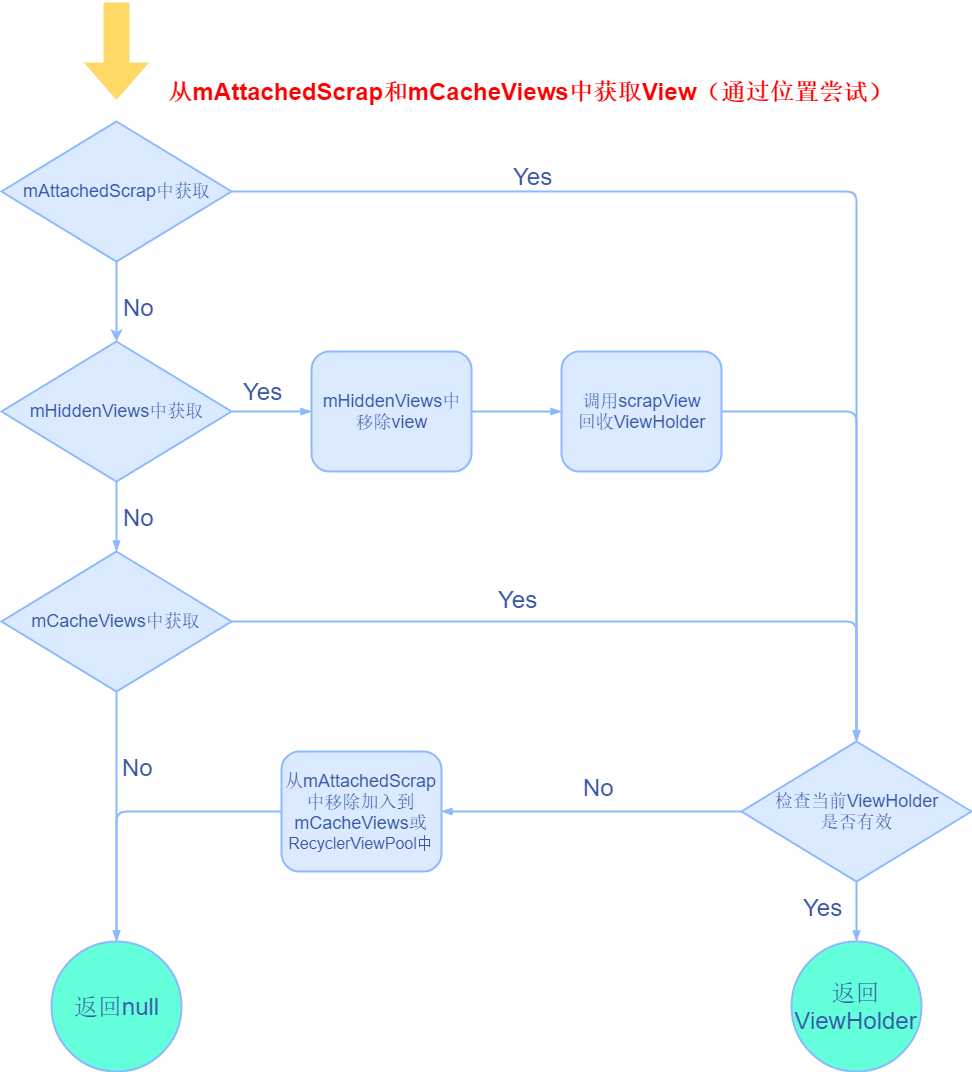
第一级缓存:从 mAttachedScrap 和 mCacheViews 中获取 View(通过位置尝试)
if (holder == null) {
    holder = getScrapOrHiddenOrCachedHolderForPosition(position, dryRun);
    if (holder != null) {
        ...
    }
}这里通过getScrapOrHiddenOrCachedHolderForPosition方法获取ViewHolder,看下内部实现:
        ViewHolder getScrapOrHiddenOrCachedHolderForPosition(int position, boolean dryRun) {
            final int scrapCount = mAttachedScrap.size();

            // Try first for an exact, non-invalid match from scrap.
            for (int i = 0; i < scrapCount; i++) {
                final ViewHolder holder = mAttachedScrap.get(i);
                ...
            }

            if (!dryRun) {
                View view = mChildHelper.findHiddenNonRemovedView(position);
                ...
            }

            // Search in our first-level recycled view cache.
            final int cacheSize = mCachedViews.size();
            for (int i = 0; i < cacheSize; i++) {
                final ViewHolder holder = mCachedViews.get(i);
                // invalid view holders may be in cache if adapter has stable ids as they can be
                // retrieved via getScrapOrCachedViewForId
                ...
            }
            return null;
}总结出来就三步:
- 从
mAttachedScrap中获取ViewHolder。 - 从
HiddenViews中获取View,再根据View获取ViewHolder; - 从
mCachedViews中获取ViewHolder。
借用网上一张图片:
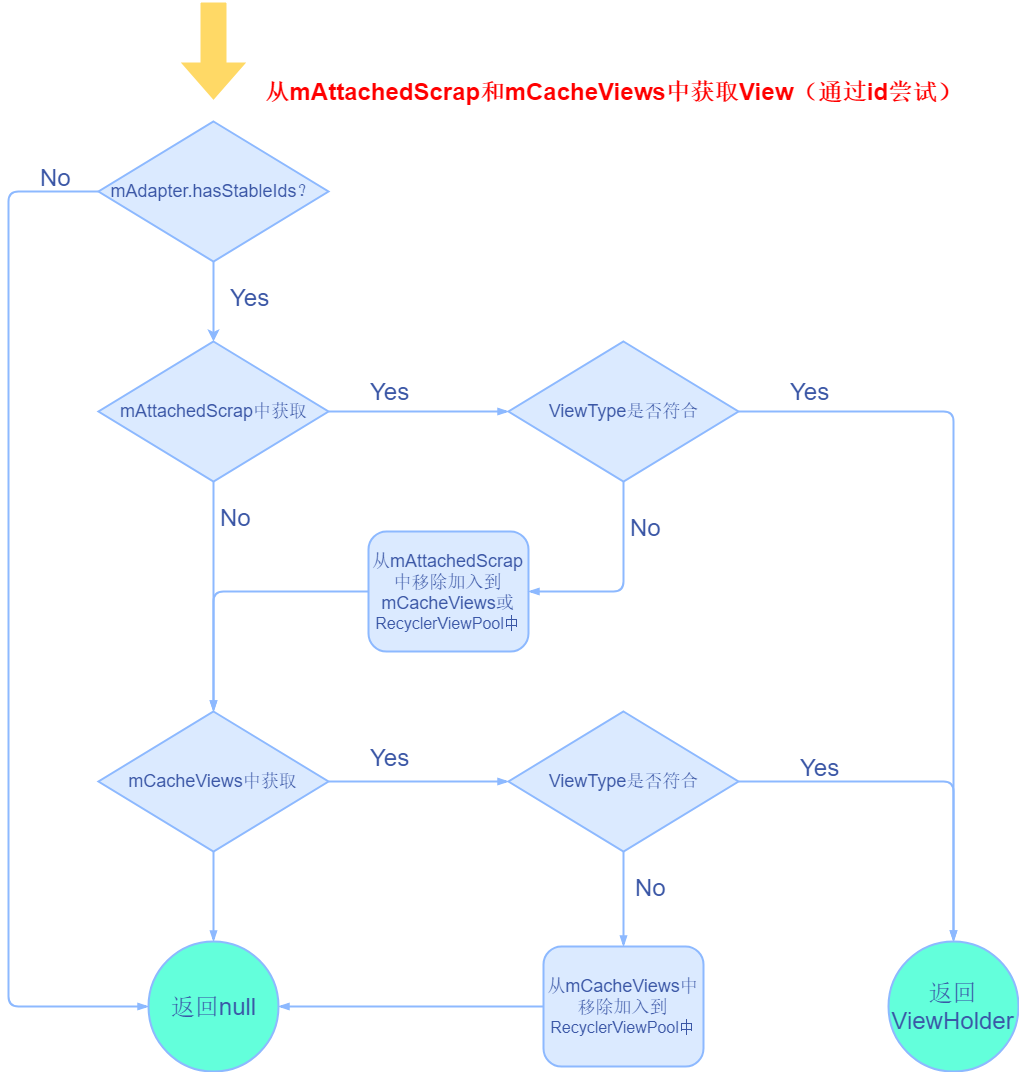
第一级缓存:从 mAttachedScrap 和 mCacheViews 中获取 View(通过id尝试)
final int type = mAdapter.getItemViewType(offsetPosition);
// 2) Find from scrap/cache via stable ids, if exists
if (mAdapter.hasStableIds()) {
    holder = getScrapOrCachedViewForId(mAdapter.getItemId(offsetPosition),
            type, dryRun);
    if (holder != null) {
        // update position
        holder.mPosition = offsetPosition;
        fromScrapOrHiddenOrCache = true;
    }
}这里先获取了多类型子View的type,而前面的却没有考虑多种子view的type情况。然后若hasStableIds()方法返回true,则调用getScrapOrCachedViewForId方法:
ViewHolder getScrapOrCachedViewForId(long id, int type, boolean dryRun) {
    // Look in our attached views first
    final int count = mAttachedScrap.size();
    for (int i = count - 1; i >= 0; i--) {
        final ViewHolder holder = mAttachedScrap.get(i);
        ...
    }

    // Search the first-level cache
    final int cacheSize = mCachedViews.size();
    for (int i = cacheSize - 1; i >= 0; i--) {
        final ViewHolder holder = mCachedViews.get(i);
        ...
    }
    return null;
}大概思路与上面类似,就是多了判断id,type的操作,所以将mHasStableIds变量设为true后,我们需要重写holder.getItemId() 方法,来为每一个item设置一个单独的id,这也和hasStableIds()方法的官方注释相符合。
第二级缓存:从mViewCacheExtension中获取ViewHolder
if (holder == null && mViewCacheExtension != null) {
    // We are NOT sending the offsetPosition because LayoutManager does not
    // know it.
    final View view = mViewCacheExtension
        .getViewForPositionAndType(this, position, type);
    if (view != null) {
        holder = getChildViewHolder(view);
        ...
    }
}这里的mViewCacheExtension用于自定义缓存,mViewCacheExtension是一个ViewCacheExtension对象,这个类是个抽象类,只定义了一个抽象方法,开发者若想实现自定义缓存,则需实现此方法。可以看出自定义缓存没什么限制,完全由开发者自己实现算法。此外普通的缓存操作都是有存放和获取的接口,而此类中只提供了获取接口,没有存放接口。
第三级缓存:从RecyclerViewPool中获取ViewHolder
if (holder == null) { // fallback to pool
    if (DEBUG) {
        Log.d(TAG, "tryGetViewHolderForPositionByDeadline("
              + position + ") fetching from shared pool");
    }
    holder = getRecycledViewPool().getRecycledView(type);
    if (holder != null) {
        holder.resetInternal();
        if (FORCE_INVALIDATE_DISPLAY_LIST) {
            invalidateDisplayListInt(holder);
        }
    }
}这里先调用getRecycledViewPool()方法获取RecycledViewPool对象:
RecycledViewPool getRecycledViewPool() {
    if (mRecyclerPool == null) {
        mRecyclerPool = new RecycledViewPool();
    }
    return mRecyclerPool;
}然后看看getRecycledView()方法:
public static class RecycledViewPool {
    private static final int DEFAULT_MAX_SCRAP = 5;

    /**
         * Tracks both pooled holders, as well as create/bind timing metadata for the given type.
         *
         * Note that this tracks running averages of create/bind time across all RecyclerViews
         * (and, indirectly, Adapters) that use this pool.
         *
         * 1) This enables us to track average create and bind times across multiple adapters. Even
         * though create (and especially bind) may behave differently for different Adapter
         * subclasses, sharing the pool is a strong signal that they'll perform similarly, per type.
         *
         * 2) If {@link #willBindInTime(int, long, long)} returns false for one view, it will return
         * false for all other views of its type for the same deadline. This prevents items
         * constructed by {@link GapWorker} prefetch from being bound to a lower priority prefetch.
         */
    static class ScrapData {
        final ArrayList<ViewHolder> mScrapHeap = new ArrayList<>();
        int mMaxScrap = DEFAULT_MAX_SCRAP;
        long mCreateRunningAverageNs = 0;
        long mBindRunningAverageNs = 0;
    }
    SparseArray<ScrapData> mScrap = new SparseArray<>();

    private int mAttachCount = 0;

    ...

        /**
         * Acquire a ViewHolder of the specified type from the pool, or {@code null} if none are
         * present.
         *
         * @param viewType ViewHolder type.
         * @return ViewHolder of the specified type acquired from the pool, or {@code null} if none
         * are present.
         */
        @Nullable
        public ViewHolder getRecycledView(int viewType) {
        final ScrapData scrapData = mScrap.get(viewType);
        if (scrapData != null && !scrapData.mScrapHeap.isEmpty()) {
            final ArrayList<ViewHolder> scrapHeap = scrapData.mScrapHeap;
            for (int i = scrapHeap.size() - 1; i >= 0; i--) {
                if (!scrapHeap.get(i).isAttachedToTransitionOverlay()) {
                    return scrapHeap.remove(i);
                }
            }
        }
        return null;
    }
    ...
}RecycledViewPool内部使用了SparseArray这个数据结构,内部的key就是我么们的ViewType,value是ScrapData的数据,里面有ArrayList<ViewHolder>的类型数据,默认的最大容量为5。而getRecycledView()这个方法就是通过mScrap由ViewType获取scrapData后,去除并返回mScrapHeap中的最后一个数据。
第四级缓存:创建ViewHolder
if (holder == null) {
    ...
    holder = mAdapter.createViewHolder(RecyclerView.this, type);
    ...
}最终就是调用adapter的createViewHolder方法,最后回调到onCreateViewHolder方法上,就是我们自己继承Adapter后实现的抽象方法,创建ViewHolder并返回。
onBindViewHolder方法
if (mState.isPreLayout() && holder.isBound()) {
    // do not update unless we absolutely have to.
    holder.mPreLayoutPosition = position;
} else if (!holder.isBound() || holder.needsUpdate() || holder.isInvalid()) {
    if (DEBUG && holder.isRemoved()) {
        throw new IllegalStateException("Removed holder should be bound and it should"
                                        + " come here only in pre-layout. Holder: " + holder
                                        + exceptionLabel());
    }
    final int offsetPosition = mAdapterHelper.findPositionOffset(position);
    bound = tryBindViewHolderByDeadline(holder, offsetPosition, position, deadlineNs);
}当我们的holder符合上述几个条件后就会调用tryBindViewHolderByDeadline方法:
private boolean tryBindViewHolderByDeadline(@NonNull ViewHolder holder, int offsetPosition,
                                            int position, long deadlineNs) {
    holder.mOwnerRecyclerView = RecyclerView.this;
    final int viewType = holder.getItemViewType();
    long startBindNs = getNanoTime();
    if (deadlineNs != FOREVER_NS
        && !mRecyclerPool.willBindInTime(viewType, startBindNs, deadlineNs)) {
        // abort - we have a deadline we can't meet
        return false;
    }
    mAdapter.bindViewHolder(holder, offsetPosition);
    long endBindNs = getNanoTime();
    mRecyclerPool.factorInBindTime(holder.getItemViewType(), endBindNs - startBindNs);
    attachAccessibilityDelegateOnBind(holder);
    if (mState.isPreLayout()) {
        holder.mPreLayoutPosition = position;
    }
    return true;
}mAdapter.bindViewHolder(holder, offsetPosition);就是调用了bindViewHolder方法,然后回调到onBindViewHolder方法,一般会在此方法中做一些View的内容设置工作。
总结
RecyclerView一共有四级缓存,mAttachedScrap,mCacheViews,ViewCacheExtension,RecycledViewPool,创建ViewHolder;其中mAttachedScrap和mCacheViews在第一次尝试时只是进行复用View,第二次尝试时区分了type,对于ViewHolder的复用。ViewCacheExtension,RecycledViewPool也是对ViewHolder的复用,区分了type。如果缓存ViewHolder时发现超过了mCacheView的限制,则会将缓存队列的第一个ViewHolder移到RecycledViewPool中。
深度分析
mAttachedScrap作用
任何一个ViewGroup都会经历两次onLayout的过程,故对应的子View就会经历detach和attach的过程,而mAttachedScrap就起到了一个缓存作用,保证ViewHolder不需要重新调用onBindViewHolder方法:
- 在第一次onLayout的过程中,会调用LayoutManager的onLayoutChildren方法对子View进行布局,这个方法里面会调用
detachAndScrapAttachedViews(recycler)对子View进行回收,不过这里因为没有子View所以不会起作用,后面会继续调用fill方法填充屏幕,fill方法中调用了layoutState.next去获取View,接着利用了前文所说的多级缓存去获取ViewHolder,但是在第一次布局中前三级缓存都不能获取到ViewHolder或View,因此只能调用onCreateViewHolder方法来创建ViewHolder。 - 第二次onLayout过程中,又会调用LayoutManager的onLayoutChildren方法,而这里此时已经有子View了,便会执行scrapOrRecycleView方法:
public void detachAndScrapAttachedViews(@NonNull Recycler recycler) {
    final int childCount = getChildCount();
    for (int i = childCount - 1; i >= 0; i--) {
        final View v = getChildAt(i);
        scrapOrRecycleView(recycler, i, v);
    }
}private void scrapOrRecycleView(Recycler recycler, int index, View view) {
final ViewHolder viewHolder = getChildViewHolderInt(view);
...
if (viewHolder.isInvalid() && !viewHolder.isRemoved()
&& !mRecyclerView.mAdapter.hasStableIds()) {
removeViewAt(index);
recycler.recycleViewHolderInternal(viewHolder);
} else {
detachViewAt(index);
recycler.scrapView(view);
mRecyclerView.mViewInfoStore.onViewDetached(viewHolder);
}
}首先就算是通过子view获取了对应的ViewHolder,然后如果ViewHolder无效且未被移除且没有稳定的ID则会被remove掉,并调用 recycler.recycleViewHolderInternal(viewHolder)进行回收,这个方法是将ViewHolder加入mCacheViews和RecyclerViewPool中。否则就detach掉该view,并调用scrapView方法,将ViewHolder加入mAttachedScrap或mChangedScrap中:
void scrapView(View view) {
    final ViewHolder holder = getChildViewHolderInt(view);
    if (holder.hasAnyOfTheFlags(ViewHolder.FLAG_REMOVED | ViewHolder.FLAG_INVALID)
        || !holder.isUpdated() || canReuseUpdatedViewHolder(holder)) {
        if (holder.isInvalid() && !holder.isRemoved() && !mAdapter.hasStableIds()) {
            throw new IllegalArgumentException("Called scrap view with an invalid view."
                                               + " Invalid views cannot be reused from scrap, they should rebound from"
                                               + " recycler pool." + exceptionLabel());
        }
        holder.setScrapContainer(this, false);
        mAttachedScrap.add(holder);
    } else {
        if (mChangedScrap == null) {
            mChangedScrap = new ArrayList<ViewHolder>();
        }
        holder.setScrapContainer(this, true);
        mChangedScrap.add(holder);
    }
}依旧是先获取ViewHolder然后进行判断,然后进行一些条件判断,符合第一个条件的就放进mAttachedScrap中,否则将该ViewHolder加入mChangeScrap中。
mAttachedScrap的主要作用就是在RecyclerView第二次layout过程中,其大小一般即为首次加载时屏幕上能放下的最大子View数。
mCacheViews作用
mCacheViews真正起作用的地方是RecyclerView发生滑动时。有两处用到了mCacheViews的缓存代码:
final int cacheSize = mCachedViews.size();
for (int i = 0; i < cacheSize; i++) {
    final ViewHolder holder = mCachedViews.get(i);
    // invalid view holders may be in cache if adapter has stable ids as they can be
    // retrieved via getScrapOrCachedViewForId
    if (!holder.isInvalid() && holder.getLayoutPosition() == position
        && !holder.isAttachedToTransitionOverlay()) {
        if (!dryRun) {
            mCachedViews.remove(i);
        }
        if (DEBUG) {
            Log.d(TAG, "getScrapOrHiddenOrCachedHolderForPosition(" + position
                  + ") found match in cache: " + holder);
        }
        return holder;
    }
}第一处这里是遍历mCacheViews,当缓存里的position和需要的position相同且有效时才复用,此时如果dryRun为false,则移除此ViewHolder。
final int cacheSize = mCachedViews.size();
for (int i = cacheSize - 1; i >= 0; i--) {
    final ViewHolder holder = mCachedViews.get(i);
    if (holder.getItemId() == id) {
        if (type == holder.getItemViewType()) {
            if (!dryRun) {
                mCachedViews.remove(i);
            }
            return holder;
        } else if (!dryRun) {
            recycleCachedViewAt(i);
            return null;
        }
    }
}这里的获取也是遍历mCacheViews,当id和viewType都相同时才复用,满足复用条件时,当dryRun为false就移除此ViewHolder。
再看下是如何将ViewHolder添加到mCacheViews中的,在recycleViewHolderInternal方法中提到过:
void recycleViewHolderInternal(ViewHolder holder) {
    ...
    if (forceRecycle || holder.isRecyclable()) {
        if (mViewCacheMax > 0
            && !holder.hasAnyOfTheFlags(ViewHolder.FLAG_INVALID
                                        | ViewHolder.FLAG_REMOVED
                                        | ViewHolder.FLAG_UPDATE
                                        | ViewHolder.FLAG_ADAPTER_POSITION_UNKNOWN)) {
            // Retire oldest cached view
            // 如果size大于等于最大容量,则删除第一个
            int cachedViewSize = mCachedViews.size();
            if (cachedViewSize >= mViewCacheMax && cachedViewSize > 0) {
                recycleCachedViewAt(0);
                cachedViewSize--;
            }

            int targetCacheIndex = cachedViewSize;
            if (ALLOW_THREAD_GAP_WORK
                && cachedViewSize > 0
                && !mPrefetchRegistry.lastPrefetchIncludedPosition(holder.mPosition)) {
                // when adding the view, skip past most recently prefetched views
                int cacheIndex = cachedViewSize - 1;
                while (cacheIndex >= 0) {
                    int cachedPos = mCachedViews.get(cacheIndex).mPosition;
                    if (!mPrefetchRegistry.lastPrefetchIncludedPosition(cachedPos)) {
                        break;
                    }
                    cacheIndex--;
                }
                targetCacheIndex = cacheIndex + 1;
            }
            // 将ViewHolder加入进来
            mCachedViews.add(targetCacheIndex, holder);
            cached = true;
        }
        if (!cached) {
            // 否则加入RecyclerViewPool中
            addViewHolderToRecycledViewPool(holder, true);
            recycled = true;
        }
    }
    ...
}如果mCachedViews现有大小>=默认大小,则会移除mCachedViews中的第一个ViewHolder,并调用recycleCachedViewAt方法使被移除的ViewHolder加入到RecyclerViewPool中,最后将需要加入缓存的ViweHolder加入到CacheViews中;
如果加入到mCacheViews中失败了,则加入到RecyclerViewPool中。
RecyclerViewPool作用
前面提到过是通过RecyclerViewPool的getRecycledView方法来获取到ViewHolder的,然后再看下是如何向RecyclerViewPool中添加ViewHolder的。
在前面mCachedViews中提到过recycleViewHolderInternal方法,这个方法中当mCachedViews现有大小>=默认大小时会将移除的ViewHolder通过recycleCachedViewAt方法使被移除的ViewHolder加入到RecyclerViewPool中,这里面就调用了addViewHolderToRecycledViewPool(viewHolder, true)方法,后面加入mCachedViews中失败后也会加入到RecyclerViewPool中,也调用了这个方法:
if (forceRecycle || holder.isRecyclable()) {
    if (mViewCacheMax > 0
        && !holder.hasAnyOfTheFlags(ViewHolder.FLAG_INVALID
                                    | ViewHolder.FLAG_REMOVED
                                    | ViewHolder.FLAG_UPDATE
                                    | ViewHolder.FLAG_ADAPTER_POSITION_UNKNOWN)) {
        // Retire oldest cached view
        int cachedViewSize = mCachedViews.size();
        if (cachedViewSize >= mViewCacheMax && cachedViewSize > 0) {
            recycleCachedViewAt(0);
            cachedViewSize--;
        }

        int targetCacheIndex = cachedViewSize;
        if (ALLOW_THREAD_GAP_WORK
            && cachedViewSize > 0
            && !mPrefetchRegistry.lastPrefetchIncludedPosition(holder.mPosition)) {
            // when adding the view, skip past most recently prefetched views
            int cacheIndex = cachedViewSize - 1;
            while (cacheIndex >= 0) {
                int cachedPos = mCachedViews.get(cacheIndex).mPosition;
                if (!mPrefetchRegistry.lastPrefetchIncludedPosition(cachedPos)) {
                    break;
                }
                cacheIndex--;
            }
            targetCacheIndex = cacheIndex + 1;
        }
        mCachedViews.add(targetCacheIndex, holder);
        cached = true;
    }
    if (!cached) {
        addViewHolderToRecycledViewPool(holder, true);
        recycled = true;
    }
}我们来看看这个方法:
void addViewHolderToRecycledViewPool(@NonNull ViewHolder holder, boolean dispatchRecycled) {
    clearNestedRecyclerViewIfNotNested(holder);
    View itemView = holder.itemView;
    if (mAccessibilityDelegate != null) {
        AccessibilityDelegateCompat itemDelegate = mAccessibilityDelegate.getItemDelegate();
        AccessibilityDelegateCompat originalDelegate = null;
        if (itemDelegate instanceof RecyclerViewAccessibilityDelegate.ItemDelegate) {
            originalDelegate =
                ((RecyclerViewAccessibilityDelegate.ItemDelegate) itemDelegate)
                .getAndRemoveOriginalDelegateForItem(itemView);
        }
        // Set the a11y delegate back to whatever the original delegate was.
        ViewCompat.setAccessibilityDelegate(itemView, originalDelegate);
    }
    if (dispatchRecycled) {
        dispatchViewRecycled(holder);
    }
    holder.mOwnerRecyclerView = null;
    getRecycledViewPool().putRecycledView(holder);
}可以发现这个方法最终调用了getRecycledViewPool().putRecycledView(holder)方法:
public void putRecycledView(ViewHolder scrap) {
    final int viewType = scrap.getItemViewType();
    final ArrayList<ViewHolder> scrapHeap = getScrapDataForType(viewType).mScrapHeap;
    if (mScrap.get(viewType).mMaxScrap <= scrapHeap.size()) {
        return;
    }
    if (DEBUG && scrapHeap.contains(scrap)) {
        throw new IllegalArgumentException("this scrap item already exists");
    }
    scrap.resetInternal();
    scrapHeap.add(scrap);
}我们可以发现这里调用了resetInternal方法,其中所有被put进入RecyclerPool中的ViewHolder都会被重置,这也就意味着RecyclerPool中的ViewHolder再被复用的时候是需要重新调用onBindViewHolder方法,这一点可以区分和mCacheViews中缓存的区别。